使用了Pelican后,最多的操作就是编译Markdown文章生成HTML文件,然后发布到Nginx的博客目录下。
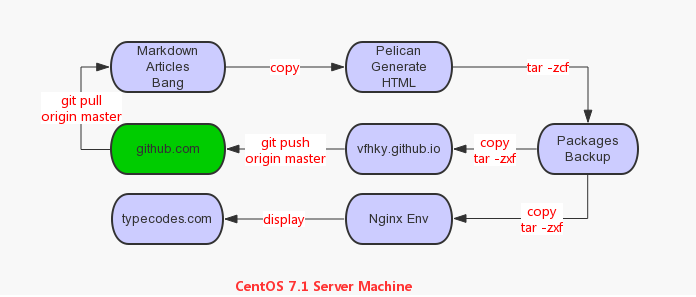
如上面的流程图所示,目前自己在CentOS7.1服务器上通过Pelican生成和发布博客的做法如下:
text.text
在Windows中写好Markdown文章,然后git push到GitHub中的私人仓库中;
在CentOS7.1服务器中git pull到本地仓库;
把Markdown文件复制到Pelican的文章目录(content)生成HTML文件;
用tar命令打包Pelcian在OUTPUT目录中生成的所有HTML文件到一个博客版本备份目录形成一个博客版本;
将这个版本复制到Nginx的博客目录下解压,这样就更新了博客;
同时,也可以发布到GitHub个人主页上。
一、考虑点
如果每次手动执行上面的操作步骤实在是太麻烦了,所以决定使用shell脚本来自动完成。当然除了实现上面的基本功能点之外,脚本还需具备如下4个特点:
text.text
脚本执行过程打印到日志文件中,方便查看;
脚本中每条重要语句的执行时间都有记录在日志中;
如果没有从GitHub个人仓库中检测到更新的文章,那么直接结束;
能自动判断是否同步发布到GitHub的个人主页中(博主的是vfhky.github.io)。
二、具体代码
代码比较简单,需要注明的是,如果个人没有Github主页的话,可以直接执行命令./github_pelican_nginx.sh即可,这样就不会执行脚本中的第7个步骤。否则,需要执行命令./github_pelican_nginx.sh "关于本次更新的说明内容"。
script.sh
#!/bin/bash
# FileName:		 github_pelican_nginx.sh
# Description:	 Synchronize markdown articles with github, convert to html files using Pelican, deliver it to nginx environment.
# Simple Usage:	 ./github_pelican_nginx.sh "commit_comments"
# Crontab Usage: 00 01 * * * /mydata/backups/bak_list/github_pelican_nginx.sh >/dev/null 2>&1
# (c) 2016 vfhky https://typecodes.com/linux/githubpelicanpublishshell.html
# https://github.com/vfhky/shell-tools/blob/master/synchronize/github_pelican_nginx.sh


# Basic command.
FINDCMD="find"
MVCMD="\mv -f"
CPCMD="\cp -rf"
RMCMD="\rm -rf"
TARXCMD="tar -zxf"
TARZIPCMD="tar --warning=no-file-changed -zcf"

# Pelican compile markdown files to html.
PELICAN_COMPILE_DIR=/mydata/GitBang/pelican
# Private bang in github for store your markdown files.
GITHUB_PELICAN_DIR=/mydata/GitBang/GitHub/BlogBak
# Backup dir for your website's version management.
PELICAN_TAR_DIR=/usr/share/nginx/html/pelican_content_bak
# Dir of your website in nginx server.
PELICAN_BLOG_DIR=/usr/share/nginx/html/pelican
# Dir for this shell script to generate logs automatically.
BLOG_PUBLISH_LOG_DIR=/mydata/backups/logs/blogpublish
# Your personal homepage in github.
GITHUB_PERSONAL_PAGE=/mydata/GitBang/GitHub/vfhky.github.io
# Articles in 15 minutes are legal.
TIME_GAP=15

# Get the newest file name.
#Newest_File="ls -lrt| tail -n 1 | awk '{print $9}'"

# Name of this shell script.
PRGNAME="github_pelican_nginx"

# Current date format: e.g 20150505_2015.
Current_Date=$(date +%Y%m%d_%H%M)

# Check if current user is root.
[ "$(id -u)" != "0" ] && echo "Error: You must be root to run this script." && exit 1

# Check parameter.
if [ $# -gt 1 ]; then
	echo "Usage:	./github_pelican_nginx.sh \"commit_comments\"" && exit 1
fi

# Run command functions.
function ERROR() {
	echo >/dev/null && echo "[$(date +%H:%M:%S:%N)][error] $*" >> ${BLOG_PUBLISH_LOG_DIR}/${Current_Date}.log
	exit 1
}

function NOTICE() {
	echo >/dev/null && echo "[$(date +%H:%M:%S:%N)][notice] $*" >> ${BLOG_PUBLISH_LOG_DIR}/${Current_Date}.log
}

function RUNCMD() {
	echo "[$(date +%H:%M:%S:%N)][notice] $*" >> ${BLOG_PUBLISH_LOG_DIR}/${Current_Date}.log
	eval $@
}

# Git pull command function.
function Git_Pull(){
  	RUNCMD "git pull origin master >/dev/null"
}

# Git commit command function.
function Git_Commit(){
	if [ $# -ne 1 ]; then
		ERROR "Usage: Git_Commit commit_comments!"
		exit 1;
	else
		RUNCMD "git pull && git add --all && git commit -m \"$1\" && git push origin master"
	fi
}

# Get the path of markdown articles in TIME_GAP minutes.
function Get_Files_Path(){
  	RUNCMD "${FINDCMD} . -mmin -${TIME_GAP} -type f -name \"*.md\" -print0"
}

# Lock down permissions.You should be careful when it comes to your website for the permission of files, but it's safe using 022.
# umask 022

# Create the log dir.
if [ ! -d $BLOG_PUBLISH_LOG_DIR ]; then
	mkdir -p $BLOG_PUBLISH_LOG_DIR
fi


# Main process begin.
NOTICE "[1]Start pull from GitHub."
RC=0
RUNCMD "cd ${GITHUB_PELICAN_DIR}/md_article && Git_Pull"

RC=$?
if [ $RC -gt 0 ]; then
	ERROR "Git pull failed!"
fi


NOTICE "[2]Start copy the pulled articles to the compile dir of PELICAN."
New_Article_Files=$(Get_Files_Path ${GITHUB_PELICAN_DIR}/md_article)
# You should not delete the double quotation marks in case of existing a blank in the file path.
for New_Article_File in "${New_Article_Files}"
do
	if [ -z "${New_Article_File}" ]; then
		echo "No articles, nothing to do."
		ERROR "No articles, nothing to do."
	fi
	FILE_PATH=$(dirname ${PELICAN_COMPILE_DIR}/content/articles/"${New_Article_Files:2}")
	RUNCMD "mkdir -p ${FILE_PATH} && ${CPCMD} \"${New_Article_File}\" ${FILE_PATH}"
done

RC=$?
if [ $RC -gt 0 ]; then
	ERROR "Copy the pulled articles failed!"
fi


NOTICE "[3]Start compile in pelican."
RUNCMD "cd ${PELICAN_COMPILE_DIR} && make publish > /dev/null"

RC=$?
if [ $RC -gt 0 ]; then
	ERROR "Compile in pelican failed!"
fi


NOTICE "[4]Start generate a tar packgage and move it to the backup dir."
# The command of tar cause the problem that file changed as we read with the value 1, so we should ignore it using OR logic.
RUNCMD "cd ${PELICAN_COMPILE_DIR}/output && ${TARZIPCMD} ${Current_Date}.tar.gz . || ${MVCMD} ${Current_Date}.tar.gz ${PELICAN_TAR_DIR}"

RC=$?
if [ $RC -gt 0 ]; then
	ERROR "Generate a tar packgage failed!"
fi


NOTICE "[5]Start unpack the target files."
RUNCMD "${CPCMD} ${PELICAN_TAR_DIR}/${Current_Date}.tar.gz ${PELICAN_BLOG_DIR} && cd ${PELICAN_BLOG_DIR} && ${TARXCMD} ${Current_Date}.tar.gz && ${RMCMD} ${Current_Date}.tar.gz"

RC=$?
if [ $RC -gt 0 ]; then
	ERROR "Unpack the target files failed!"
fi

# if [ $# -eq 1 ]; then
if [ -n "$1" ]; then
	echo "You're going to synchronize your weibsite to the homepage on github.com."
	NOTICE "[6]Start copy the packgage to the local homepage bang cloned from remote in GitHub."
	RUNCMD "${CPCMD} ${PELICAN_TAR_DIR}/${Current_Date}.tar.gz ${GITHUB_PERSONAL_PAGE} && cd ${GITHUB_PERSONAL_PAGE} && ${TARXCMD} ${Current_Date}.tar.gz && ${RMCMD} ${Current_Date}.tar.gz"

	RC=$?
	if [ $RC -gt 0 ]; then
		ERROR "Copy the packgage to the local homepage bang failed!"
	fi

	NOTICE "[7]Start synchronize website to my homepage on GitHub."
	# read -p "Please input your comments on this commitment: " COMMIT_COMMENTS
	# while [[ -z "${COMMIT_COMMENTS}" ]]
	# do
	# 	read -p "Comments can not be empty.Please input again: " COMMIT_COMMENTS
	# done
	# RUNCMD "Git_Commit \"${COMMIT_COMMENTS}\""
	RUNCMD "Git_Commit \"$1\""

	RC=$?
	if [ $RC -gt 0 ]; then
		ERROR "Synchronize website to GitHub failed!"
	fi
else
	echo "Not synchronize your weibsite to the homepage on github.com."
	NOTICE "[6]Not synchronize your weibsite to the homepage on github.com."
fi


NOTICE "------END------"
exit 0
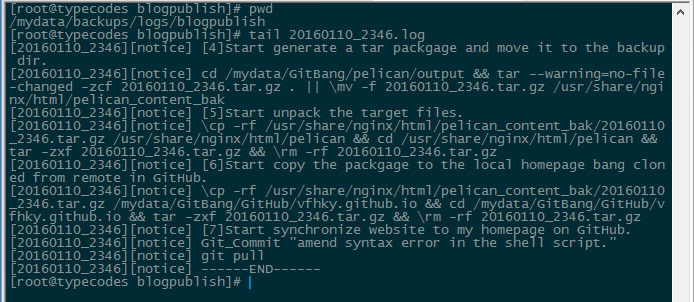
三、脚本执行结果
四、脚本管理
目前已经把这个脚本放在Github了,地址是https://github.com/vfhky/shell-tools,以后脚本的更新或者更多好用的脚本也都会加入到这个工程中。
评论
评论加载中…