这是《2015年博客升级记》系列文章的第六篇,主要记录如何在CentOS 7.1中Nginx如何配置HTTPS和SPDY。关于具体如何编译安装Nginx,可以查看文章《2015博客升级记(三):CentOS 7.1编译安装Nginx1.9.0》。
一、重点:Nginx配置文件nginx.conf的具体内容
text.text
######
###  Description: The config file of Nginx with ssl, spdy, no-www redircting, gzip functions
###  Author:  vfhky  2015.05.05  https://typecodes.com/web/centos7nginxhttpsspdy.html
######
user  nginx nginx;
worker_processes  1;

error_log  /var/log/nginx/error.log;
#error_log  logs/error.log  notice;
#error_log  logs/error.log  info;

pid        /var/run/nginx/nginx.pid;


events {
    worker_connections  1024;
}


http {
    include       mime.types;
    default_type  application/octet-stream;

    log_format  main  '$remote_addr - $remote_user [$time_local] "$request" '
                      '$status $body_bytes_sent "$http_referer" '
                      '"$http_user_agent" "$http_x_forwarded_for"';

    access_log  /var/log/nginx/access.log  main;

    sendfile        on;
    #tcp_nopush     on;

    #keepalive_timeout  0;
    keepalive_timeout  65;

    #隐藏Nginx版本信息,禁止网站目录浏览
    server_tokens off;
    autoindex off;
    #当FastCGI后端服务器处理请求给出http响应码为4xx和5xx时,就转发给nginx
    fastcgi_intercept_errors on;

    #关于fastcgi的配置
    fastcgi_connect_timeout 300;
    fastcgi_send_timeout 300;
    fastcgi_read_timeout 300;
    fastcgi_buffer_size 64k;
    fastcgi_buffers 4 64k;
    fastcgi_busy_buffers_size 128k;
    fastcgi_temp_file_write_size 128k;

    #支持gzip压缩
    gzip on;
    gzip_min_length 1k;
    gzip_buffers 16 64k;
    gzip_http_version 1.1;
    gzip_comp_level 6;
    gzip_types text/plain application/x-javascript text/css application/javascript text/javascript image/jpeg image/gif image/png application/xml application/json;
    gzip_vary on;
    gzip_disable "MSIE [1-6].(?!.*SV1)";

    #
    # 重定向所有带www请求到非www的请求
    #
    server {
	    listen               *:80;
	    listen               *:443 ssl spdy;
	    server_name www.typecodes.com;
	    # ssl证书配置见文章 https://typecodes.com/web/lnmppositivessl.html
	    ssl_certificate /etc/nginx/ssl/typecodes.crt;
	    # ssl密钥文件见文章 https://typecodes.com/web/lnmppositivessl.html
	    ssl_certificate_key /etc/nginx/ssl/typecodes.key;
		# 不产生日志
		access_log off;

	    # 访问favicon.ico和robots.txt不跳转(把这两个文件存放在上级目录html中)
	    location ~* ^/(favicon.ico|robots.txt)$ {
	    	root html;
	    	expires max;
	    	log_not_found off;
	    	break;
	    }

	    location / {
	    	return 301 https://typecodes.com$request_uri;
	    }
    }

    #
    # 将所有http请求重定向到https
    #
    server {
	    listen               *:80;
	    server_name          typecodes.com;
		# 不产生日志
		access_log off;

	    # 访问favicon.ico和robots.txt不跳转(把这两个文件存放在上级目录html中)
	    location ~* ^/(favicon.ico|robots.txt)$ {
	    	root html;
	    	expires max;
	    	log_not_found off;
	    	break;
	    }

	    location / {
	    	return 301 https://typecodes.com$request_uri;
	    }
    }

    #
    # HTTPS server
    #
    server {
	    listen               *:443 ssl spdy;
	    server_name typecodes.com;

	    # ssl证书配置见文章 https://typecodes.com/web/lnmppositivessl.html
        ssl_certificate /etc/nginx/ssl/typecodes.crt;
        # ssl密钥文件见文章 https://typecodes.com/web/lnmppositivessl.html
        ssl_certificate_key /etc/nginx/ssl/typecodes.key;
        ssl_session_cache shared:SSL:20m;
        ssl_session_timeout 10m;
        ssl_ciphers ECDHE-RSA-AES128-GCM-SHA256:ECDHE-ECDSA-AES128-GCM-SHA256:ECDHE-RSA-AES256-GCM-SHA384:ECDHE-ECDSA-AES256-GCM-SHA384:DHE-RSA-AES128-GCM-SHA256:DHE-DSS-AES128-GCM-SHA256:kEDH+AESGCM:ECDHE-RSA-AES128-SHA256:ECDHE-ECDSA-AES128-SHA256:ECDHE-RSA-AES128-SHA:ECDHE-ECDSA-AES128-SHA:ECDHE-RSA-AES256-SHA384:ECDHE-ECDSA-AES256-SHA384:ECDHE-RSA-AES256-SHA:ECDHE-ECDSA-AES256-SHA:DHE-RSA-AES128-SHA256:DHE-RSA-AES128-SHA:DHE-DSS-AES128-SHA256:DHE-RSA-AES256-SHA256:DHE-DSS-AES256-SHA:DHE-RSA-AES256-SHA:AES128-GCM-SHA256:AES256-GCM-SHA384:AES128-SHA256:AES256-SHA256:AES128-SHA:AES256-SHA:AES:CAMELLIA:DES-CBC3-SHA:!aNULL:!eNULL:!EXPORT:!DES:!RC4:!MD5:!PSK:!aECDH:!EDH-DSS-DES-CBC3-SHA:!EDH-RSA-DES-CBC3-SHA:!KRB5-DES-CBC3-SHA:!CAMELLIA;
        ssl_protocols TLSv1 TLSv1.1 TLSv1.2; #enables TLSv1, but not SSLv2, SSLv3 which is weak and should no longer be used.
        ssl_prefer_server_ciphers on;
        # 开启spdy功能
        add_header Alternate-Protocol 443:npn-spdy/3.1;
        # 严格的https访问
        add_header Strict-Transport-Security "max-age=31536000; includeSubdomains;";

        #设置网站根目录
        root   /usr/share/nginx/html/typecodes;
        index  index.php index.html;

        charset utf-8;

        #access_log  /var/log/nginx/log/host.access.log  main;

        #设置css/javascript/图片等静态资源的缓存时间
        location ~ .*\.(css|js|ico|png|gif|jpg|json|mp3|mp4|flv|swf)(.*) {
            expires 60d;
        }

        # include /etc/nginx/default.d/*.conf;
        # 设置typecho博客的config文章不被访问,保证安全
        location = /config.inc.php{
            deny  all;
        }

        # keep the uploads directory safe by excluding php, php5, html file accessing. Applying to wordpress and typecho.
        # location ~ .*/uploads/.*\.(php|php5|html)$ {
        #   deny  all;
        # }

        # 设置wordpress和typecho博客中,插件目录无法直接访问php或者html文件
        location ~ .*/plugins/.*\.(php|php5|html)$ {
            deny  all;
        }

        #Rewrite的伪静态(针对wordpress/typecho),url地址去掉index.php
        location / {
            if (-f $request_filename/index.html){
                rewrite (.*) $1/index.html break;
            }
            if (-f $request_filename/index.php){
                rewrite (.*) $1/index.php;
            }
        if (!-f $request_filename){
                rewrite (.*) /index.php;
            }
        }

	    #访问favicon.ico时不产生日志
	    location = /favicon.ico {
	    	access_log off;
	    }

	    #设置40系列错误的应答文件为40x.html
        error_page  400 401 402 403 404  /40x.html;
        location = /40x.html {
                root   html;
                index  index.html index.htm;
        }

        #设置50系列错误的应答文件为50x.html
        #
        error_page   500 501 502 503 504  /50x.html;
        location = /50x.html {
            root   html;
            index  index.html index.htm;
        }

        # proxy the PHP scripts to Apache listening on 127.0.0.1:80
        #
        #location ~ \.php$ {
        #    proxy_pass   http://127.0.0.1;
        #}

        # 设置Nginx和php通信机制为tcp的socket模式,而不是直接监听9000端口
        location  ~ .*\.php(\/.*)*$ {
             fastcgi_split_path_info ^(.+\.php)(/.+)$;
             #fastcgi_pass   127.0.0.1:9000;
             # the better form of fastcgi_pass than before
             fastcgi_pass   unix:/var/run/php-fpm/php-fpm.sock;
             fastcgi_index  index.php;
             fastcgi_param  SCRIPT_FILENAME  $document_root$fastcgi_script_name;
             include        fastcgi_params;
        }

        # deny access to .htaccess files, if Apache's document root
        # concurs with nginx's one
        #
        #location ~ /\.ht {
        #    deny  all;
        #}
    }
}
二、Nginx开启spdy功能
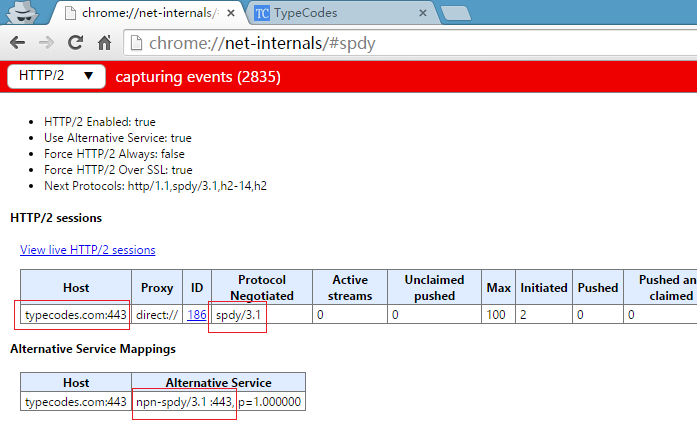
如下图所示,在chrome浏览器的地址栏中输入chrome://net-internals/#spdy抓取访问事件,然后新建一个页面打开自己的博客,这样就会被第一个页面抓取到了。
三、Nginx中url地址中,将带www的二级域名跳转到不带www顶级域名
博客目前将http访问全部定向到https,同时将https://www.typecodes.com重定向到https://typecodes.com上。前文[《阿里云CentOS 6.5系统LNMP环境安装SSL证书》](https://typecodes.com/web/lnmppositivessl.html “查看原文”)中,只做了http跳转到https。需要注意的是,在Nginx配置中最好不要包含过多的if判断语句;另外,处理不同的server_name时,官方建议写在多个server块中,就像小节1中的那样。
四、其他说明
由于LNMP配置比较繁琐,所以我建了一个关于Nginx、MySQL和PHP配置的git工程,方便查询。目前这个工程托管在GitHub和coding.net上,地址如下:
GitHub地址:https://github.com/vfhky/mylnmp ;
Coding地址:https://coding.net/u/vfhky/p/mylnmp/git 。
评论
评论加载中…