在Linux中如果应用程序会产生日志,那么就需要考虑日志切割,例如按照固定的大小切割、按照日期进行切割等等。同样,在编译Nginx1.9.0、MySQL5.7.7rc和PHP7后,这三个应用服务都会产生日志,尤其是Nginx进程根据配置文件ngnix.conf记录每条访问记录到access.log中。如果所有的日志都打印到同一个文件中的话,那么时间长了的话就会影响效率。
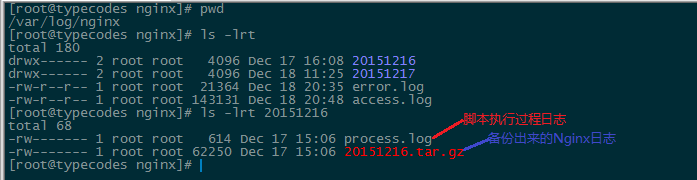
这篇文章就是针对Linux下应用使用shell脚本进行分割的描述,该脚本特点是:按天切割、自定义切割出来的日志保留的天数以及记录脚本执行过程和耗时。在使用时需要配置好对应应用的日志目录(Source_Log_Dir变量)、日志备份目录(Backup_Dirs变量),然后使用Crontab定时任务执行该脚本即可。
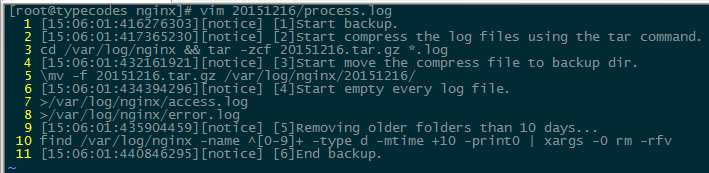
下面是脚本nginx_log_backup.sh的具体内容,这里备份的是Nginx日志,其它诸如MySQL、php等Linux应用只要修改脚本对应的日志路径即可。目前该脚本已经同步到博客在GitHub上创建的关于LNMP配置的工程上了,地址是:https://github.com/vfhky/mylnmp。
script.sh
#!/bin/bash
# Backup Log Files for linux applications such as nginx, php, mysql and so on.
# Crontab Usage: 00 01 * * * /mydata/backups/bak_list/nginx_log_backup.sh >/dev/null 2>&1
# (c) 2015 vfhky https://typecodes.com/linux/applogsbackup.html
# https://github.com/vfhky/mylnmp/blob/master/nginx_log_backup.sh

# Basic command.
TARCMD="tar -zcf"
MVCMD="\mv -f"
FINDCMD="find"

# Number of days to keep.
NUMDAYS=40

# Path of the logs you want backup.You can set it as the nginx log path or the mysql log path and so on.
Source_Log_Dir=/var/log/nginx
# Set the file types you want backup accoding to the suffix of log files.
Source_Log_Files=`ls ${Source_Log_Dir}/*.log`
# Set the backup path.
Backup_Dirs=${Source_Log_Dir}
# Previous date format: e.g 20150505
Previous_Date=`date -d "-1 days" +%Y%m%d`
# The target backup dir.
Backup_Dir=${Backup_Dirs}/${Previous_Date}
# Path of the log generated by this shell script automatically.
Shell_Log=${Backup_Dir}/process.log


# Run command functions.
function ERROR() {
  echo >/dev/null && echo "[`date +%H:%M:%S:%N`][error] $@" >> ${Shell_Log}
  exit 1
}

function NOTICE() {
  echo >/dev/null && echo "[`date +%H:%M:%S:%N`][notice] $@" >> ${Shell_Log}
}

function RUNCMD() {
  echo $@ >> ${Shell_Log}
  eval $@
}


# Check the days user input.You can delete the codes below generally.
if [[ ! $NUMDAYS =~ ^[0-9]+$ ]]; then
  ERROR "Invalid number of days[$NUMDAYS]!"
elif [ "$NUMDAYS" -eq "0" ]; then
  ERROR "Number of days must be greater than zero!"
fi


# Lock down permissions.
umask 077

# Create the backup log dir and a shell log.
mkdir -p $Backup_Dir
touch $Shell_Log


NOTICE "[1]Start backup."


NOTICE "[2]Start compress the log files using the tar command."
RUNCMD "cd ${Source_Log_Dir} && ${TARCMD} ${Previous_Date}.tar.gz *.log"

RC=$?
if [ $RC -gt 0 ]; then
  ERROR "Creat the backup package failed!"
fi


NOTICE "[3]Start move the compress file to backup dir."
RUNCMD "${MVCMD} ${Previous_Date}.tar.gz ${Backup_Dir}/"

RC=$?
if [ $RC -gt 0 ]; then
  ERROR "Move the compress file failed!"
fi


NOTICE "[4]Start empty every log file."

for file in ${Source_Log_Files}
do
    RUNCMD ">$file"
	RC=$?
	if [ $RC -gt 0 ]; then
	  ERROR "Empty every log file failed!"
	fi
done


NOTICE "[5]Removing older folders than $NUMDAYS days."
# ls ${Source_Log_Dir} | grep '^[0-9]\{8\}$' | xargs rm -rf
RUNCMD "$FINDCMD ${Source_Log_Dir} -type d -name [0-9]*\[0-9] -mtime +$NUMDAYS | xargs rm -rf"


NOTICE "[6]End backup."

exit 0
评论
评论加载中…